Every ruble the business makes — on your phone
We build management accounting end to end: banks, payment providers, CRM and ad accounts connect over their APIs, money sorts itself into cost items, and P&L and cash flow are recalculated every hour. You open an app on your phone and see what you actually earned — today, not at the end of the quarter. From ₽50,000.
DEMO DATA. THE LIVE SYSTEM REFRESHES EVERY HOUR
Bookkeeping answers to the state: file the returns, avoid the fine. The question «how much did I make this month and where is the money» it answers a quarter late and in somebody else's language.
Management accounting answers to you. It shows money the way you think about it: business lines, cost items, payroll, advertising, taxes — and one profit figure at the bottom that can be reconciled against the balance in your bank account.
If the numbers can't be
reconciled with the bank,
they are feelings, not accounting
| Owner's question | Today | With the system |
|---|---|---|
| What did I earn in September? | «I'll ask the accountant in November» | Visible today, down to the cost item |
| Where does the money go? | A 400-line bank statement | 8–15 plain items and the share of each |
| Does advertising pay off? | Spend in the ad account, revenue in the CRM | Side by side, with cost of sale |
| Can we cover payroll? | Counted on a napkin | Balances, obligations and the payout date |
| Can I check it on holiday? | Call the office | An app on your phone, five seconds |
One principle: a number gets into the system on its own. Manual entry stays only where a source physically cannot hand over data — petty cash, for instance.
| Source | What we pull | How | Status |
|---|---|---|---|
| Banks | Account balances, every transaction, outgoing payment orders | Bank API where one exists; otherwise automated statement import | working |
| Payments and acquiring | Payments, fees, refunds, settlement reports | API | working |
| CRM and platforms | Orders, payments, managers, sources, refunds | API or direct database access | working |
| Ad accounts | Spend, clicks, campaigns — by day | API | working |
| Marketplaces | Sales, commissions, logistics, payouts | Seller account API | with caveats |
| Accounting software | Accruals, acts, reference data | File export or data exchange | project by project |
| Cash and the rest | Petty cash, loans, settlements with individuals | Two-click manual entry or a spreadsheet | manual only |
The list is open: if you have a source that isn't here, we check at the discovery call whether it hands over data and tell you straight whether it can be connected.
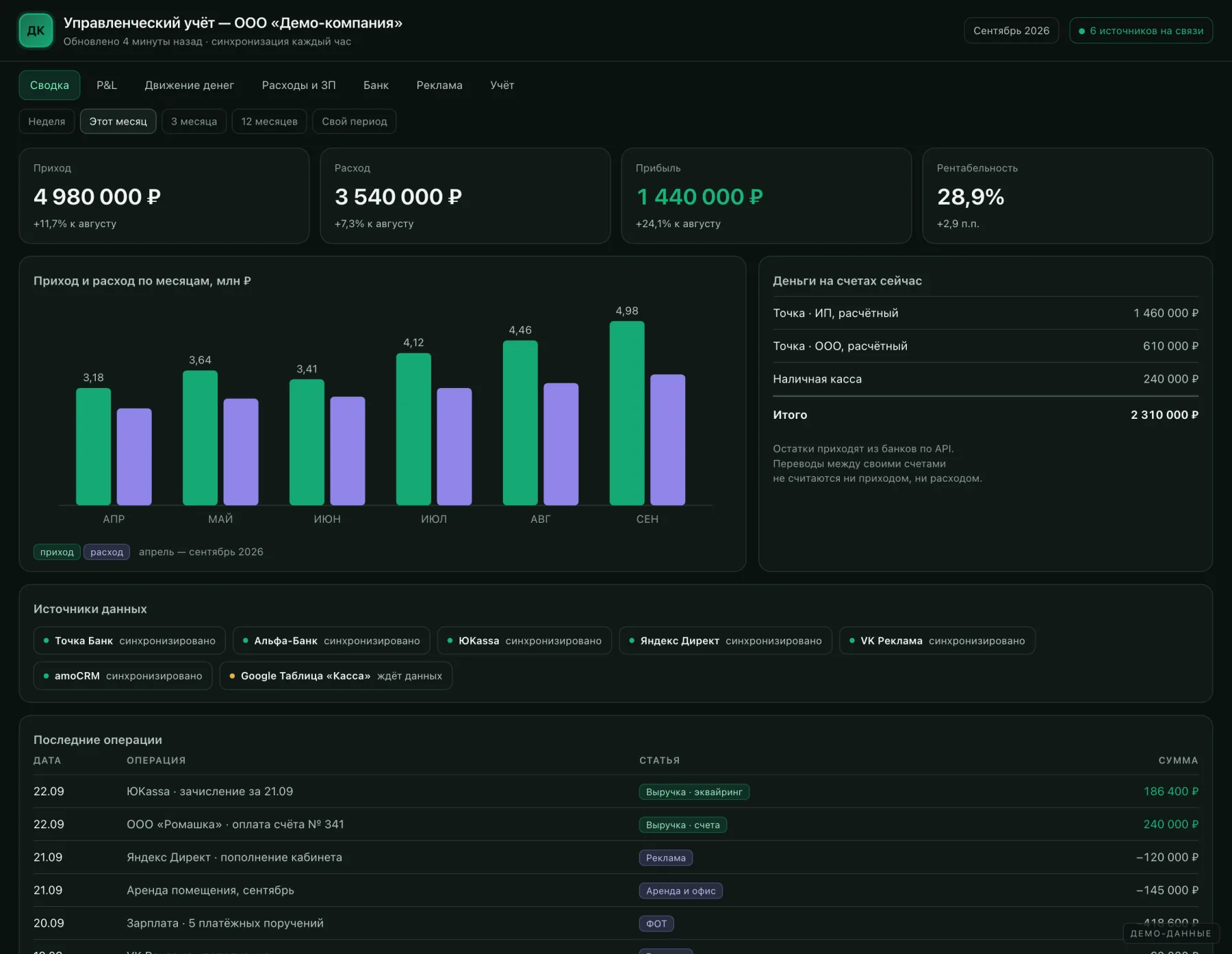
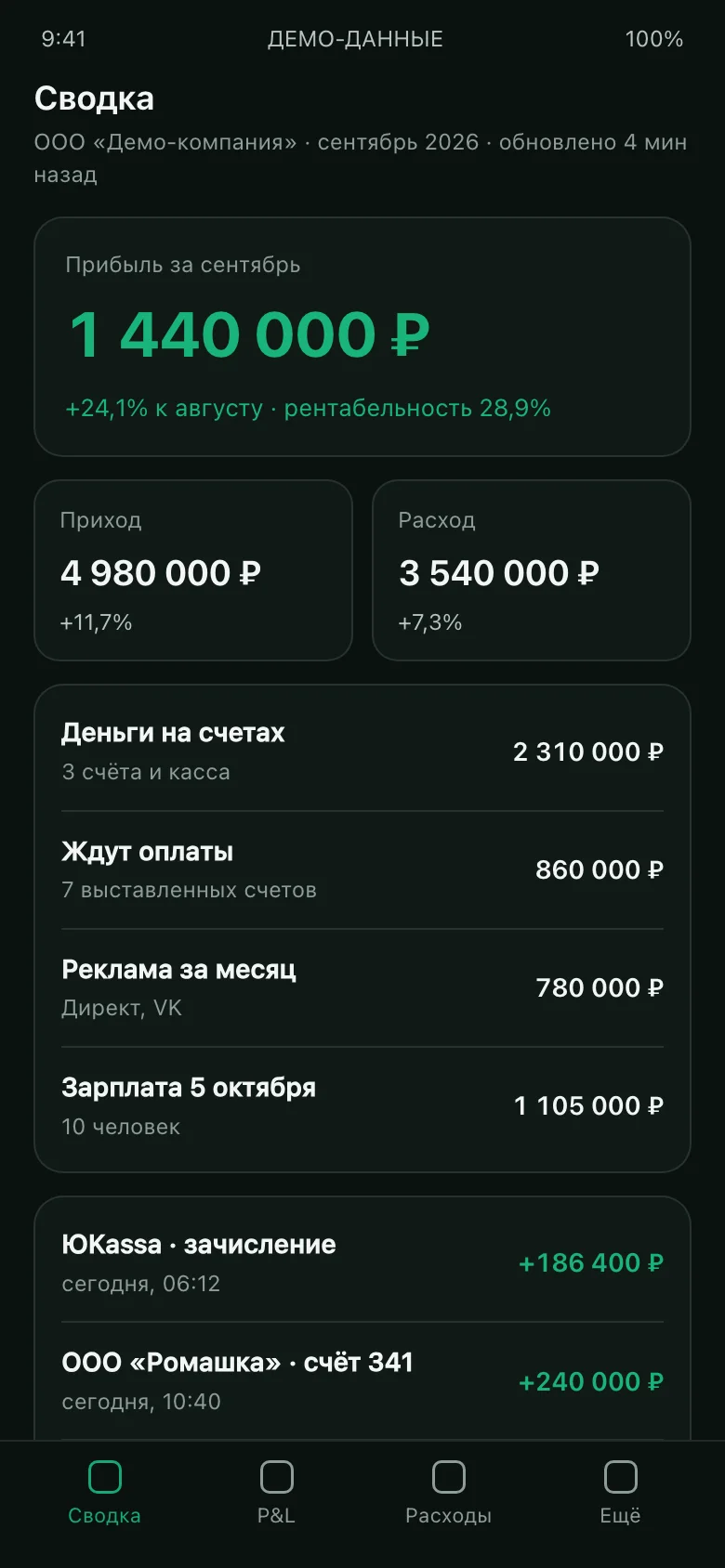
The same accounting lives as an icon on your home screen. Open it and you see the month's profit, account balances, the next payroll run and the latest incoming payments. Five seconds, no laptop, no phone call to the accountant.
Open the phone —
see the profit.
That's it
- Installed from a link in a minute — open the address, «Add to Home Screen», done. No App Store, no Google Play, no review queue.
- iPhone and Android alike — it is a web app (PWA), not two separate builds to keep in sync.
- Password protected, the session lasts 30 days, one click to sign out. Lost the phone — revoke the access.
- Access per person — the owner sees everything, a line manager sees their own numbers, the accountant sees costs only.
- Alerts on large incoming and outgoing payments — delivered to Telegram, so they don't depend on phone settings.
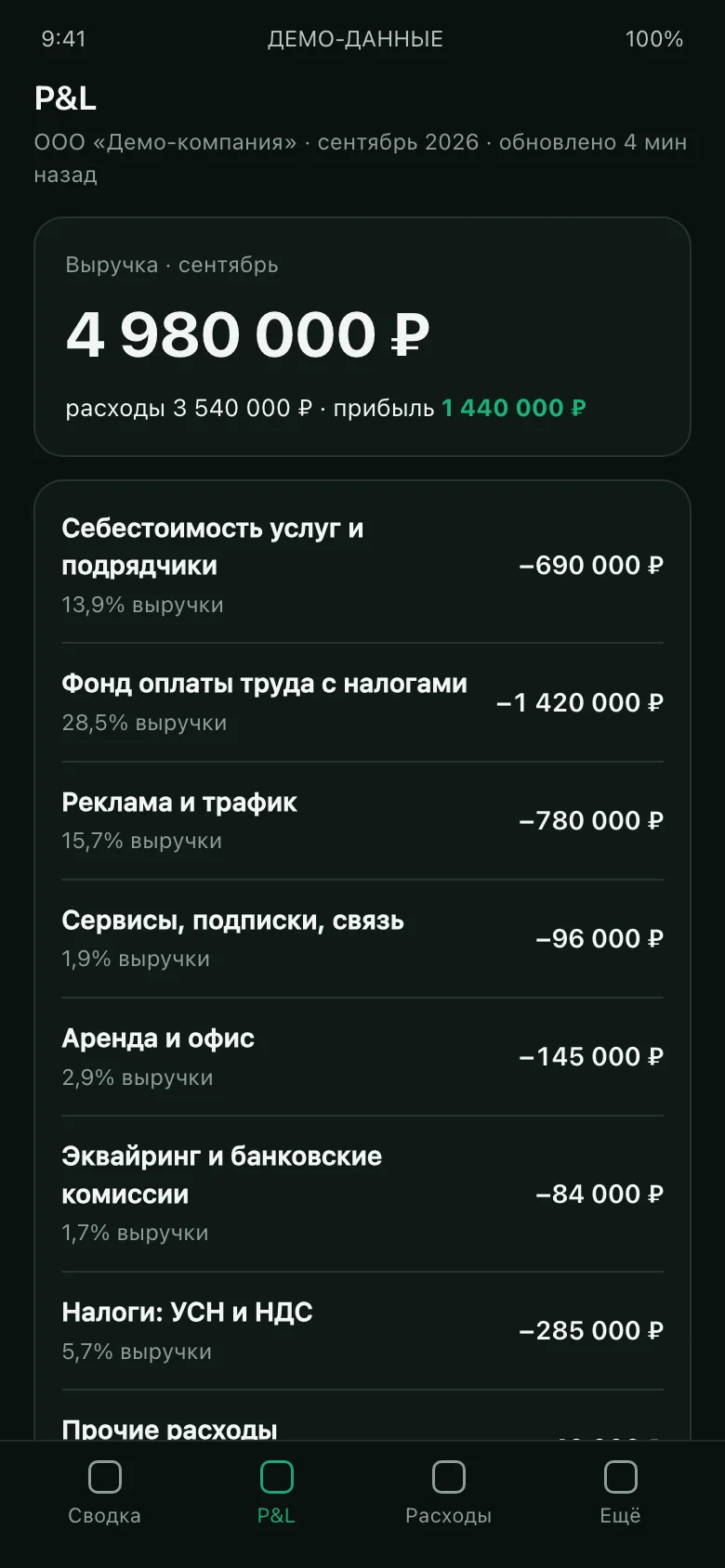
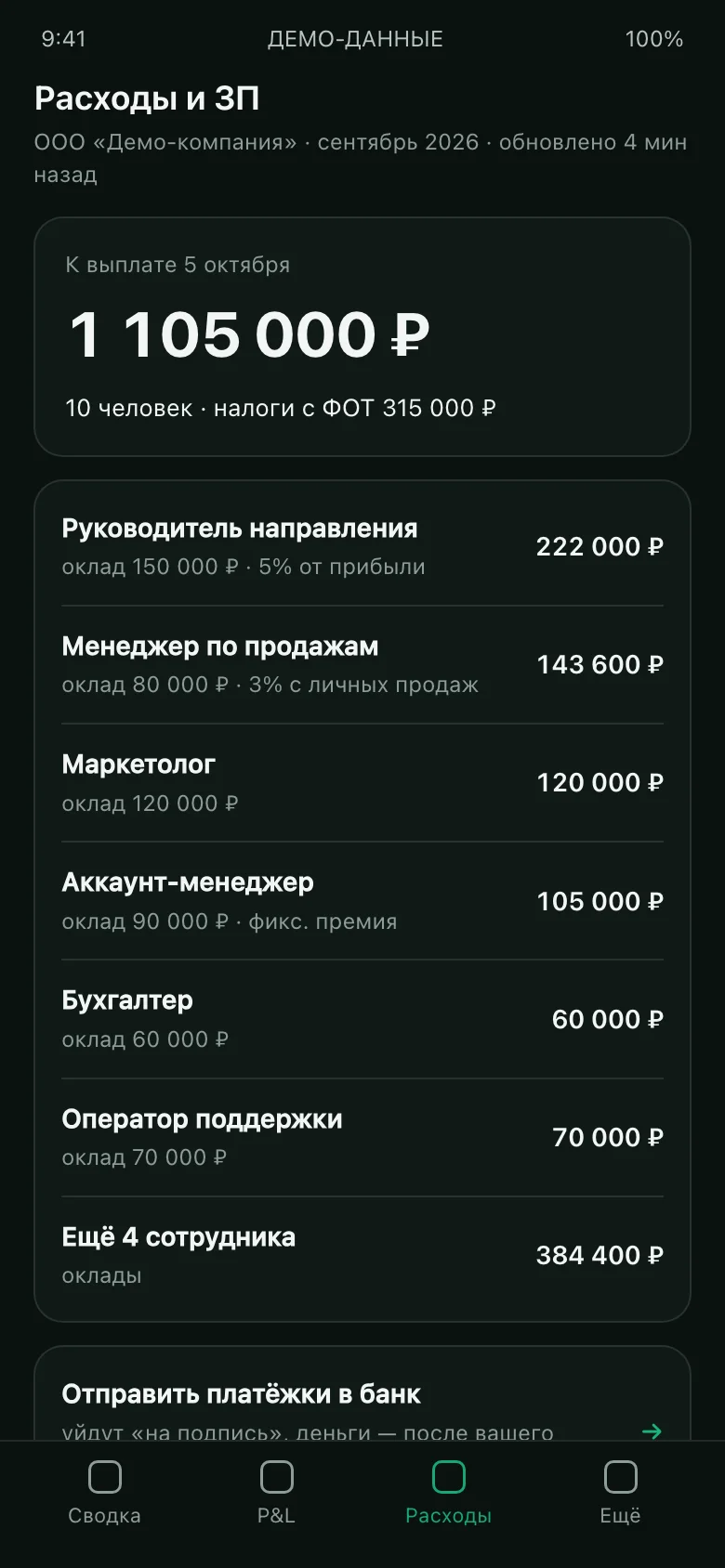
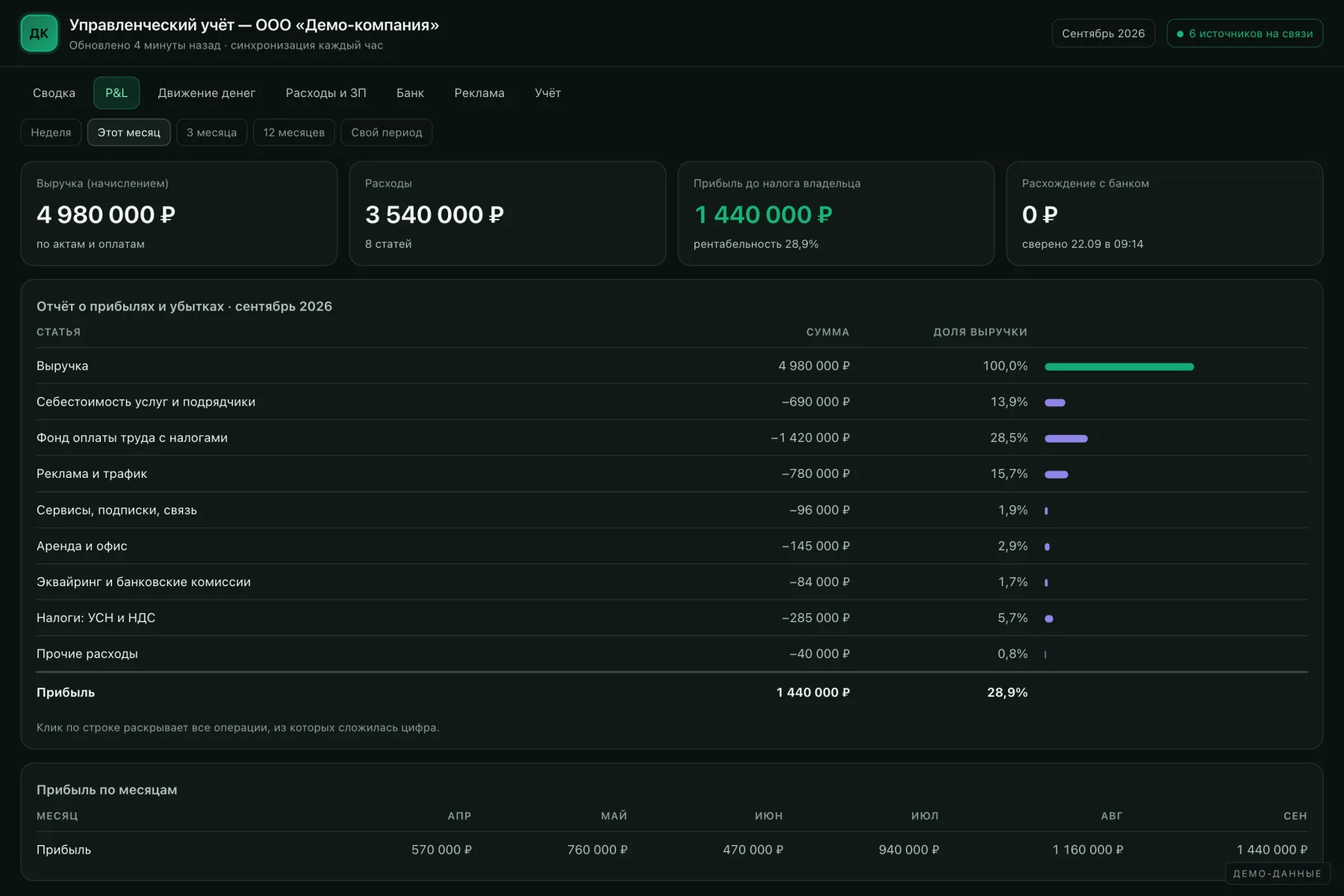
- P&L — profit on an accrual basis: revenue, cost of delivery, payroll, advertising, taxes, profit and margin. By month and for any period.
- Cash flow — what actually arrived and left. Next to the P&L it exposes the cash gap: profit on paper, no money in the account — and why.
- Business lines — several products, branches or legal entities are each counted separately and roll up into one total.
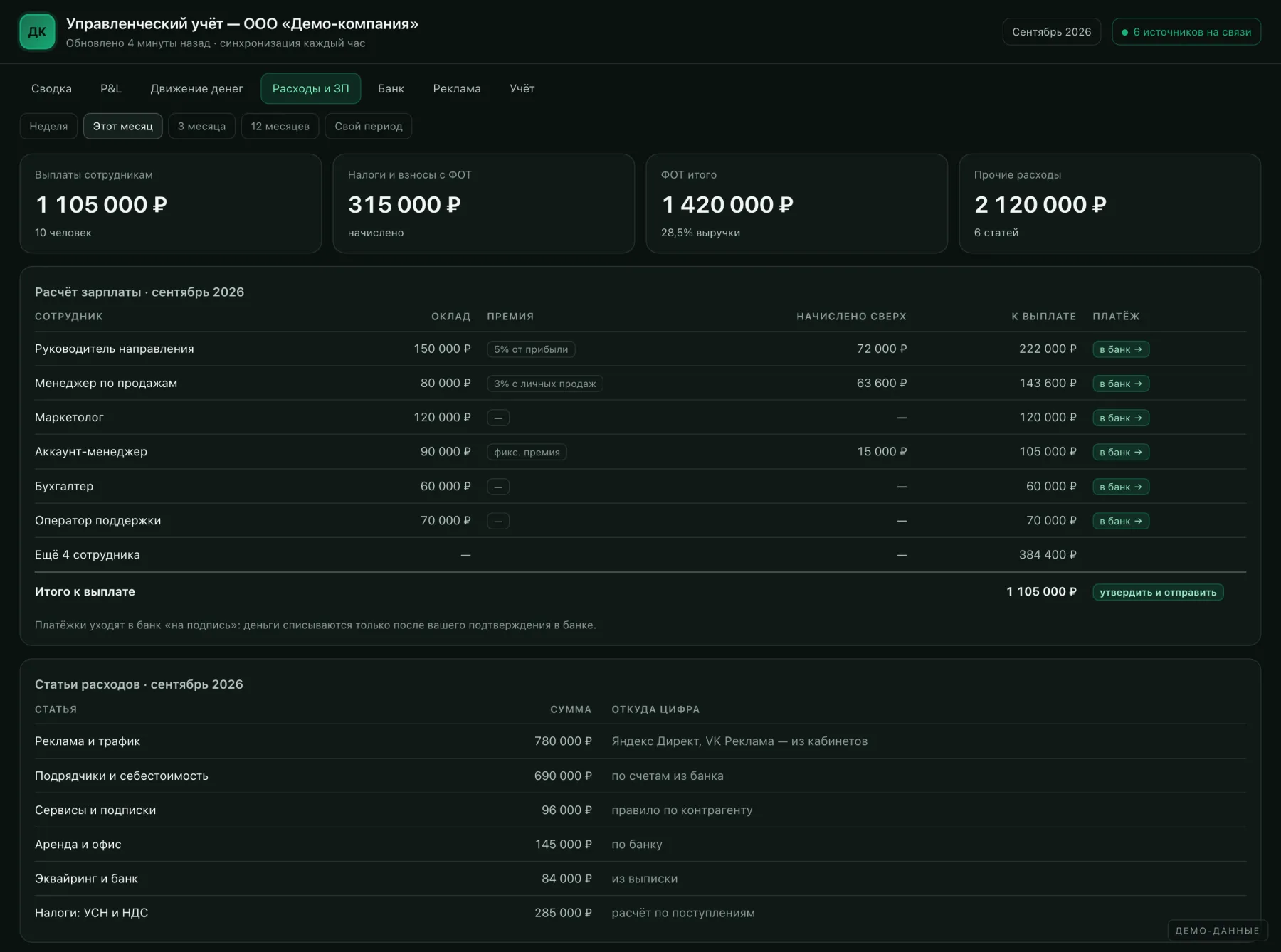
- Payroll and bonuses — salaries, commission on personal sales, profit-share bonuses; payment orders sent to the bank for signature.
- Taxes — calculated under your tax regime from actual receipts, so the amount never comes as a surprise.
- Bank reconciliation — a daily check that the books match real balances. A gap is highlighted, not hidden.
We built it for ourselves first
The system we offer grew out of our own setup: an online school on a learning platform, business bank accounts, ad accounts and our Genosai service with its own database. All of it feeds one dashboard that calculates P&L across three business lines, runs payroll for the team and sends payment orders to the bank.
The screenshots above are interface mock-ups on invented figures: we publish neither our clients' money nor our own. On a call we show the live system with real data.
- Decisions in a day, not a quarter. You see which line feeds the company and which one eats the profit while it can still be fixed.
- Time saved. Assembling the report by hand costs 8–20 hours a month — yours, the accountant's or an analyst's. The system does it in an hour, without copy-paste errors.
- One version of the truth. No more «my spreadsheet says otherwise»: one source, one set of rules, a full history of changes.
- Cash gaps visible in advance. Obligations, balances and expected receipts on one screen — you learn about a shortfall two weeks out, not on payday.
- Advertising measured in profit. Spend from the ad accounts and revenue from the CRM sit side by side: cost of sale and payback per channel, with no manual matching.
- Payroll calculates itself. Commission and bonuses by the rules, not «roughly like last month». Disputed amounts are visible to both sides.
- Control without micromanagement. A line manager sees their own numbers and spots the dip themselves, before the weekly meeting.
- Spending discipline. Once subscriptions and «small» charges land in one line, 3–7% of the budget usually turns out to be running on inertia.
- Ready for an investor or a sale. A 12-month P&L with transaction-level detail is the first thing a buyer, a bank or an investor asks for.
- Not dependent on one person. The analyst quits or the accountant falls ill — the accounting keeps running, the knowledge doesn't leave with the laptop.
- The system is yours. Source code and data are handed over: develop it in-house or with any other contractor.
- It grows with the business. A new line, a second legal entity, another bank — added as a source, not as yet another spreadsheet.
This is not a magic button. Here is everything people usually discover mid-project — better to know it upfront and decide whether the project suits you.
| Limitation | What it means in practice | How we handle it |
|---|---|---|
| It does not replace bookkeeping | The system does not file tax returns and does not keep statutory records. It is a report for the owner, not for the tax office. | It works alongside your accountant; where needed we pull accruals and acts from the accounting software |
| Garbage in, garbage out | If payment descriptions all read «payment under invoice» and half the CRM orders have no source, the first month's numbers will be arguable. | For the first 2–4 weeks we tune the classification rules with you; after that the system learns on its own |
| It needs your time at the start | 2–4 hours to map out how money moves, then 20–30 minutes a week early on to confirm disputed transactions. | Meetings are short and to the point; anything solvable without you, we solve ourselves |
| Not every source hands over data | Some banks have no open API, marketplaces report with a delay and not every field, some ad accounts restrict access. | At the discovery stage we test every source and say plainly what will be API and what will be an import |
| Cash and off-the-books payments | Anything that never touches an account or a till is invisible to the system — it has to be entered by hand or left as a gap. | We make manual entry a two-click job and add an explicit «exclude» flag |
| This is sensitive data | The system holds all of the company's money and salaries. «Where is it stored and who can see it» becomes a real question. | Deployed on your server or ours, password protected, role-based access, daily backups |
| It does not evolve by itself | A new legal entity or a change in the bonus rules means somebody has to update the settings. | Much of it is editable in the interface; the rest is support work or your own developer on our source code |
| It will not create profit | Accounting shows where money leaks; the decisions are still yours. Without changes in how you work the numbers stay the same. | Once a month we go through the report with you and suggest what to change — if you want that |
Mapping the money
An hour or two of conversation: which accounts, tills, ad accounts and services exist, how you think about lines and cost items. The output is a map of the future system and a list of sources marked «hands over data / doesn't».
Connecting the sources
We set up access, pull the historical data and reconcile the first figures against the bank. This step alone usually surfaces costs everyone had forgotten about.
Classification and P&L
We configure the rules: which counterparty maps to which item, what counts as revenue, how shared costs are split. Then we assemble the P&L, cash flow and payroll.
App and handover
We install the app for you and the team, set up the access levels, and walk through how to read every figure and where to verify it. Source code and documentation are handed over.
from ₽50,000
The base setup, turnkey: one bank, one revenue source, P&L and cash flow, the phone app, training and handover of the source code. Three to five weeks.
The exact figure follows the discovery call: it depends on the number of sources, the number of legal entities and the state of the data. The estimate is fixed before work starts.
Always included
- Connecting the sources and loading historical data
- Classification rules by cost item and business line, built around your business
- P&L, cash flow, costs, payroll, taxes, bank reconciliation
- The phone app for you and the team, with role-based access
- Backups and the ability to roll back to a previous version
- Source code and data — yours, with the documentation
No. We fit around what already works. Changing makes sense only if a source hands over no data at all — and we say so plainly.
It is the normal case. Each one is counted separately and rolls up into a total; transfers between your own accounts are not double counted.
On your server or ours, your choice. Password protected, role-based access, daily backups.
The system stays with you along with the source code, the data and the documentation. Your own developer or any other contractor can take it forward.
Two to four hours of discovery, then 20–30 minutes a week for the first couple of weeks. After that — just reading the reports.
Yes — the base setup is the pilot: one bank and one revenue source. If it works for you, we add the rest.
Let's run it on your numbers
A free discovery session: we look at the sources you have, what can be pulled automatically and what your P&L would look like. You get a map and an estimate, with no obligation.
Book a discovery call